 Strata Site Audit
Every layer of a WordPress site, read and ranked.
Strata reads every layer of a site you did not build, and tells you what to fix first.
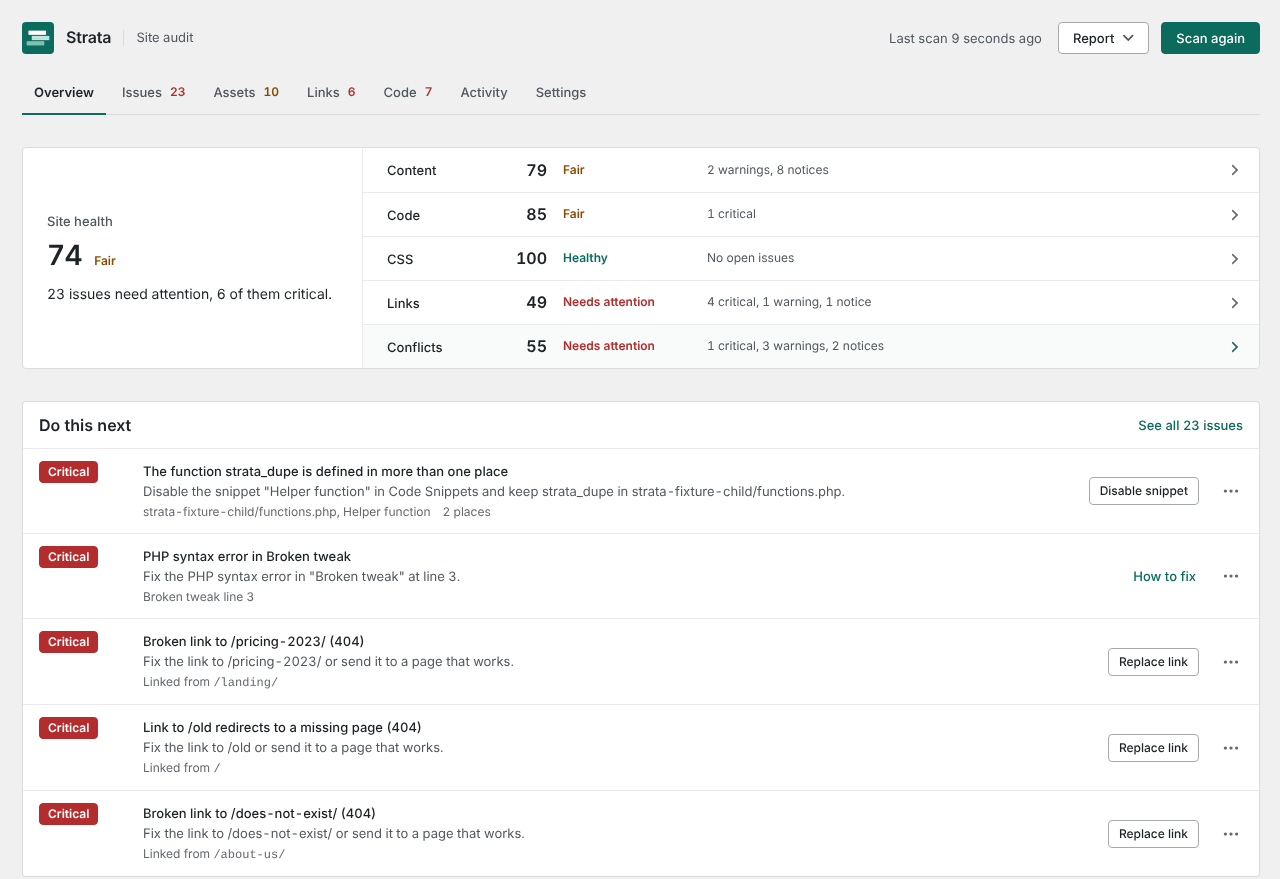
Six layers, one picture of the site.
Posts and pages are only the top layer. Strata reads the page builder, the theme, the snippet and redirect plugins, the stylesheets and the media library, and keeps track of where each thing is used.
Builders and content
- Elementor: pages, templates, popups, Theme Builder conditions, global colors and fonts, and HTML widgets
- Block editor: content, block types and synced patterns
- Media library: every image and file, and every page, setting and stylesheet that uses it
- Theme and child theme files, compared with the parent release if you ask
Code, CSS and redirects
- Custom CSS from the Customizer and from Elementor
- Snippet plugins: WPCode, Code Snippets, Simple Custom CSS and JS, Elementor Custom Code and Astra Custom Layouts
- Redirects from Redirection, Rank Math, Yoast SEO Premium and Safe Redirect Manager
- Your own pages, crawled from the server, to check every internal link, image, script and stylesheet
Every finding says what to do about it.
One Issues list, ranked by severity and then by how many pages each issue affects. Every row says in plain words what to do, and the fix is right there when Strata can make it safely.
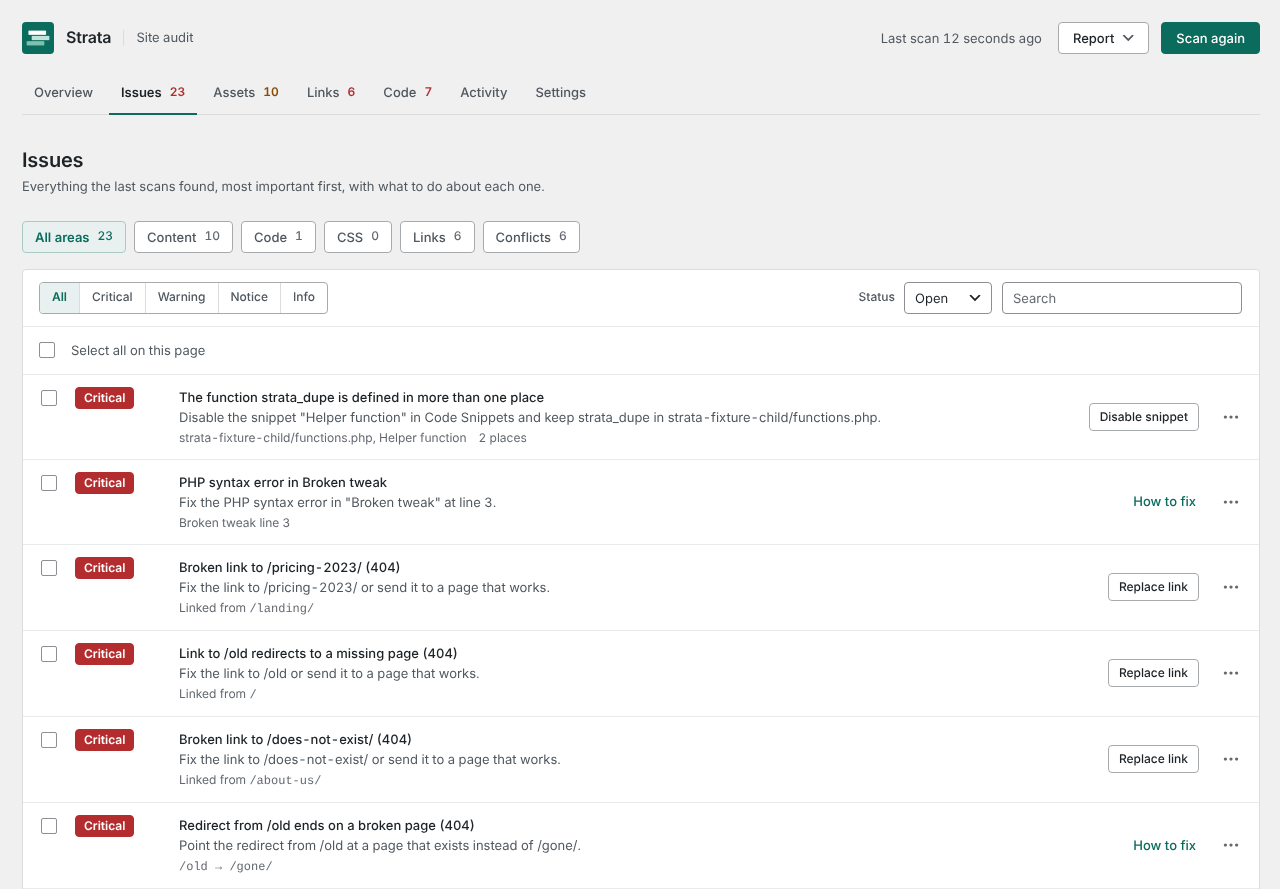
Broken and redirected
Internal links and missing images, scripts and stylesheets. Redirect chains, loops, redirects that end on a 404, and the same address redirected by two plugins.
Unused and orphaned
Templates, popups, globals and synced patterns nothing uses. Templates that point at deleted templates. Header or footer templates that target the same pages. Files nothing appears to use.
Conflicting and duplicated
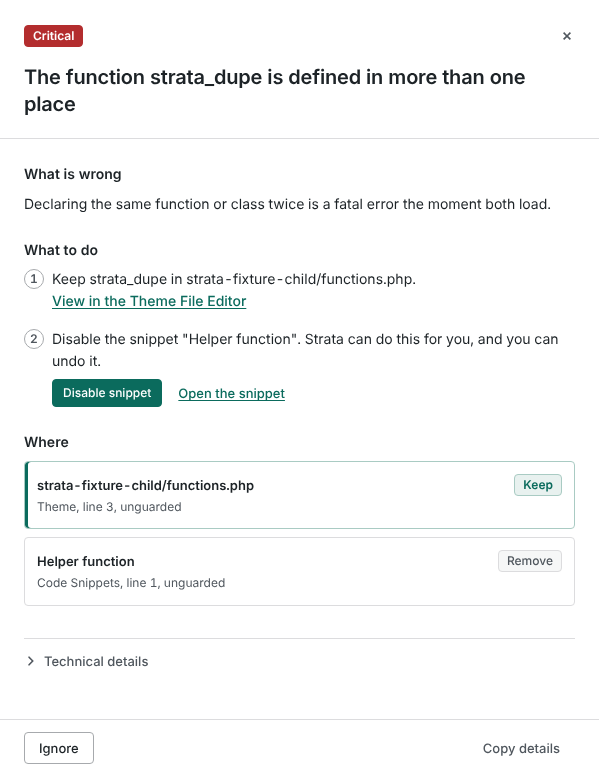
The same function defined twice, two snippets fighting over one filter, a tracking tag or library loaded twice, CSS set differently in several places, and the same file uploaded more than once.
It tells you which copy to keep.
When a function, snippet, tracking tag or CSS value is set twice, Strata says which copy wins, which to remove and where each one lives, then offers to do it.
Eight safe fixes, every one saved first and undone from the Activity screen: disable a snippet, move an unused template or media file to the trash, remove an unused global, add a redirect, collapse a redirect chain, replace a broken link, add alt text. Strata never edits theme files and never deletes anything permanently on its own. When you are sure, Assets > Trash empties the media trash or deletes the files you pick, after a question that names them.
One health score, three severities.
The Overview opens on one score for the whole site and a sentence on what needs attention, with a score for each area beside it. Every issue carries a level, shown as a color and a word so it reads the same for everyone.
Visitors or search engines hit a dead end, or code will not run: broken links, PHP syntax errors, redirect loops.
Something works but costs you: CSS set differently in several places, an image far larger than any screen, the same address redirected by two plugins.
Worth a look when you have time: a template nothing uses, a redirect chain, deprecated WordPress functions.

Free finds the problems. Pro keeps watching.
The free plugin is the whole audit. Pro adds what you need when you look after several sites for other people: schedules, history, alerts and reports with your name on them.
Free
The whole audit, run by hand, on as many sites as you like.
- All six scanners: code, builder, media, links and redirects, CSS, conflicts
- One health score and a Do this next list
- Eight safe fixes, one at a time, with undo
- Media library grid with previews, unused files and duplicates
- Empty the media trash, after you confirm
- Scan one area or the whole site
- Link check of up to 500 pages
- CSV report
- WP-CLI commands
Pro adds
For sites you look after over time, and for clients.
- Scheduled scans with email and Slack alerts
- Scan history and what changed since last time
- A log of the 404 pages visitors hit, with suggested redirects
- External link checks
- Likely unused CSS selectors
- Unused Elementor add-on plugins
- Merge duplicate media and trash the extra copies
- Bulk fixes with one Undo batch
- White-label PDF reports and CSV
- Multisite network overview
- No crawl limit, and a faster crawl that paces itself to your site
Questions people ask before installing
Does any data leave my site?
Not unless you choose to. Scans run entirely on your server. Strata contacts outside servers only when you choose a feature that needs one: the optional parent theme comparison (WordPress.org), Freemius licensing for Pro, Slack alerts (Pro) and external link checks (Pro).
Does Strata run the code it scans?
No. PHP is parsed into a syntax tree and read. Nothing is included or executed.
Do I need Elementor?
No. Strata reads the block editor, themes, custom CSS, code snippet plugins and redirect plugins on any site. Elementor support is built in for sites that use it.
Will a scan slow down my site?
Scans run in the background in short steps, and the link checker waits between requests. Visitors are not affected. On a large site a full scan can take a while; you can pause, resume or cancel it at any time.
Can I undo a fix?
Yes. Every change appears on the Activity screen with an Undo button. Undo first checks whether the post changed since the fix; if you edited it in between, Strata reverses only its own change and keeps your edits.
Will Strata delete my images?
Not unless you ask it to. Strata's fixes never delete files permanently. An unused file can be moved to the WordPress trash after you confirm, and Undo in Activity brings it back until WordPress empties the trash (30 days by default). Strata refuses when any use it can find remains, and offers no trash at all on sites where the trash is turned off. To delete for good, Assets > Trash lists the files in the trash: tick the ones to delete or use Empty trash. Strata asks first and names the files, then checks each one again and keeps any that a page, a setting or builder data still uses. A permanent delete removes the file and every size of it from the server and cannot be undone; Activity records it.
Which page builders does Strata understand?
Elementor (Free and Pro) and the block editor are read in detail: templates, global colors and fonts, widgets and their links and images. Other builders are not parsed, but the code, CSS, link, conflict and media checks work on any site.
What does Strata need to run?
WordPress 6.5 or newer and PHP 7.4 or newer. It works on shared and managed hosting, and on multisite.